Home security has a buying pattern that wastes money: four cameras covering every corner, none of them configured, all of them noisy. The pattern that works is the opposite — one well-placed camera watching what matters, configured so its notifications are worth reading. This guide covers placement, height, angle, and the settings that turn a camera from a gadget into a habit.
The One Camera That Matters: The Approach
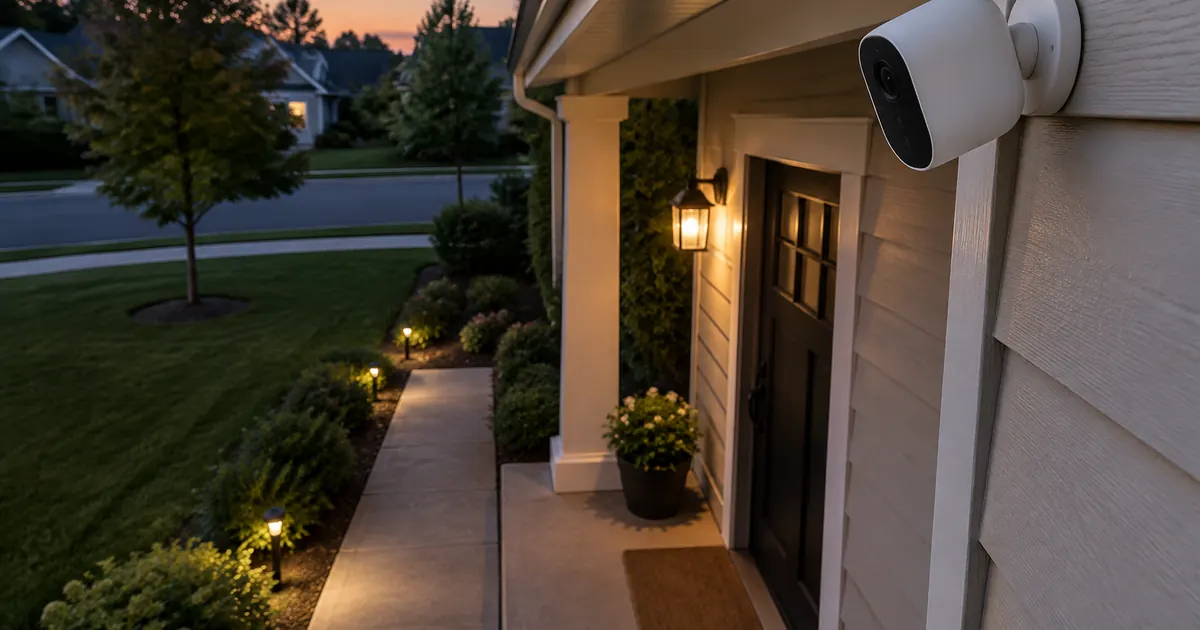
Nearly everything worth recording happens on the approach to your door: packages, porch visitors, and the rare stranger checking cars. The Battery-Powered Stick-Up Camera covers that approach from a single mount — front-facing, covering the door and the driveway or walkway that reaches it. Indoor cameras answer questions the approach cannot ("is the dog on the couch"), but the exterior approach is where security actually lives, and it is the mount that justifies the purchase.
Height: The Nine-Foot Rule
Mount at about nine feet — high enough that the camera catches faces rather than crowns, low enough that the frame keeps the detail that identifies anything worth identifying. Higher mounts see more and recognize less; the nine-foot compromise is the one security installers actually use. The battery design means no wiring: the mount goes anywhere the WiFi reaches, which is the second consideration.
Angle: Down the Approach, Not Across It
The common mistake is mounting the camera parallel to the wall, watching the door in profile. The better angle points down the approach path — the walkway, driveway, or stairs a visitor actually uses — so faces arrive in frame early and stay in frame. Test with your phone standing where the camera will mount: if you can see your own face clearly at the property line, the angle is right.
WiFi: The Spec That Decides Everything
Wireless cameras live or die by signal strength at the mount. The stick-up camera connects to 2.4GHz WiFi — the band that travels farther through walls than 5GHz, which is why it is the standard for outdoor devices. Check signal with a phone at the mount height before drilling; two bars or better means clean video, and one bar means the router needs a mesh node before the camera needs mounting.
The Settings That Make It Calm
- Motion zones: exclude the street and sidewalk — the camera should watch your property, not the neighborhood's foot traffic.
- Sensitivity: set for people, not squirrels; the default is always too eager.
- Notification schedule: instant during work hours and nights, silent during the hours you are home anyway.
- Clip storage: memory card for privacy-first households, cloud for the ones who want footage to survive the camera itself.
Ten minutes of configuration is the difference between a camera that informs and one that exhausts — and it is the configuration, not the camera, that determines whether the purchase was smart.
Battery Life: The Honest Rhythm
Battery cameras with sane settings run five to seven weeks per charge; the cameras that die in ten days are the ones watching a busy street at maximum sensitivity. The recharge rhythm — a USB-C top-up while you take the trash out — becomes a two-minute monthly habit. Weatherproofing is built in: the weatherproof housing handles Chicago winters and Texas summers alike, which is the quiet advantage of battery mounts: they move with your security needs instead of your wiring.
Indoor Cameras: The Second Mount
Households that start with the approach camera usually add an indoor one within a season — for pets, packages-in-the-hallway, or the basement nobody visits. The same rules apply indoors with one change: privacy zones. The app's privacy masking blacks out regions of the frame (the bedroom door, the neighbor's window through the glass), and it is the feature that makes an indoor camera compatible with a household's actual life rather than a surveillance state. The battery stick-up moves between indoor and outdoor mounts in seconds, which is why one camera often does both jobs.
The Monthly Two-Minute Check
Security hardware is the rare category where maintenance is a glance: once a month, open the app, check the battery percentage, watch one clip end to end to confirm the angle still points where it should (wind and bumps move mounts), and confirm the storage is recording. The camera's app shows all four in one screen, and the habit — trash day works well — is the difference between a security system and a device that was one.
Our Security Cameras collection holds the stick-up and the accessories that complete the mount, with free US shipping, tax-free pricing, and 30-day returns — because the honest test is whether you check the app less and trust it more. You will.